Quilting Forum

Announcement

Collapse
No announcement yet.

Latest Forum Posts

Collapse

Trending Forum Posts

Collapse

  • how much fabric for trees
    how much fabric is needed for trees...
  • Happy Dance! I won ribbons!
    Home from the Maine Quilts show where my Color my World quilt, rename ‘Home,’ received 3 ribbons. I’m overwhelmed...
  • What I learned
    Well, here it is, the end of 2022, and I finally have finished my 2021 BOM quilt! I apologize that the photo is not centered....
  • Late at this but having difficulty
    Hi There,

    I hope you can help me. I know I'm very late in getting to this point but life is finally allowing...
  • Adding house numbers
    I'm quite behind on my BOM, but now have all the tall buildings of the outer ring done. I would like to add some house...
  • Ahhhhh.. almost done! Have a question!!
    Hi all.. I am behind in my Color My World and just starting the skyscrapers... Does anyone have the finished size (with...
  • My Colorful World With Parks by Duffy
    My quilt is finish
  • Printing for paper piecing question
    For anyone paper piecing, is your quarter inch a tiny bit larger? When I’m trimming up the finished building, I line...
  • Paper piecing color my world…anyone else?
    I decided early to do paper piecing instead of the wax…I’m more comfortable . However, I have a few questions…anyone...
  • Video Access
    Will we have access to the Color My World videos after December 31st? I can't seem to find info on this.
  • New to The Quilt Show
    I am BRAND NEW to the Quilt Show and fell in love with this pattern. I downloaded all of the instructions. My concern is......
  • How to download pattern?
    I'm a new-ish star member and would like to download the "Color My World" pattern...but I can't find where to...
  • Quilting color my world
    See how I quilted Color My World and the added surprise quilting in Wendy’s border:

    https://bbquiltmaker.b...
  • Getting outer circle to lie flat
    Hello - I know someone has solved this problem...I seem to remember a question arising when we put the inner circle together...
  • Great new way to see all the photos!
    Cap'n John showed me a new feature--you can see all the photos posted on any particular topic--at once.

    Open...
  • Color My World Pattern - Download Heads Up
    I know Barbara has reminded us to download all files prior to the end of the year. I finished my downloads today and decided...
  • Color my world — your finish here
    Please use this topic to share your FINISHED top or quilt here. This will make it easy to see all the great quilts everyone...
  • Quilt is complete. Fun!
  • Loading...
  • No more items.

can't see the blank pattern

Collapse
X
  • Time
  • Show
Clear All
new posts

    can't see the blank pattern

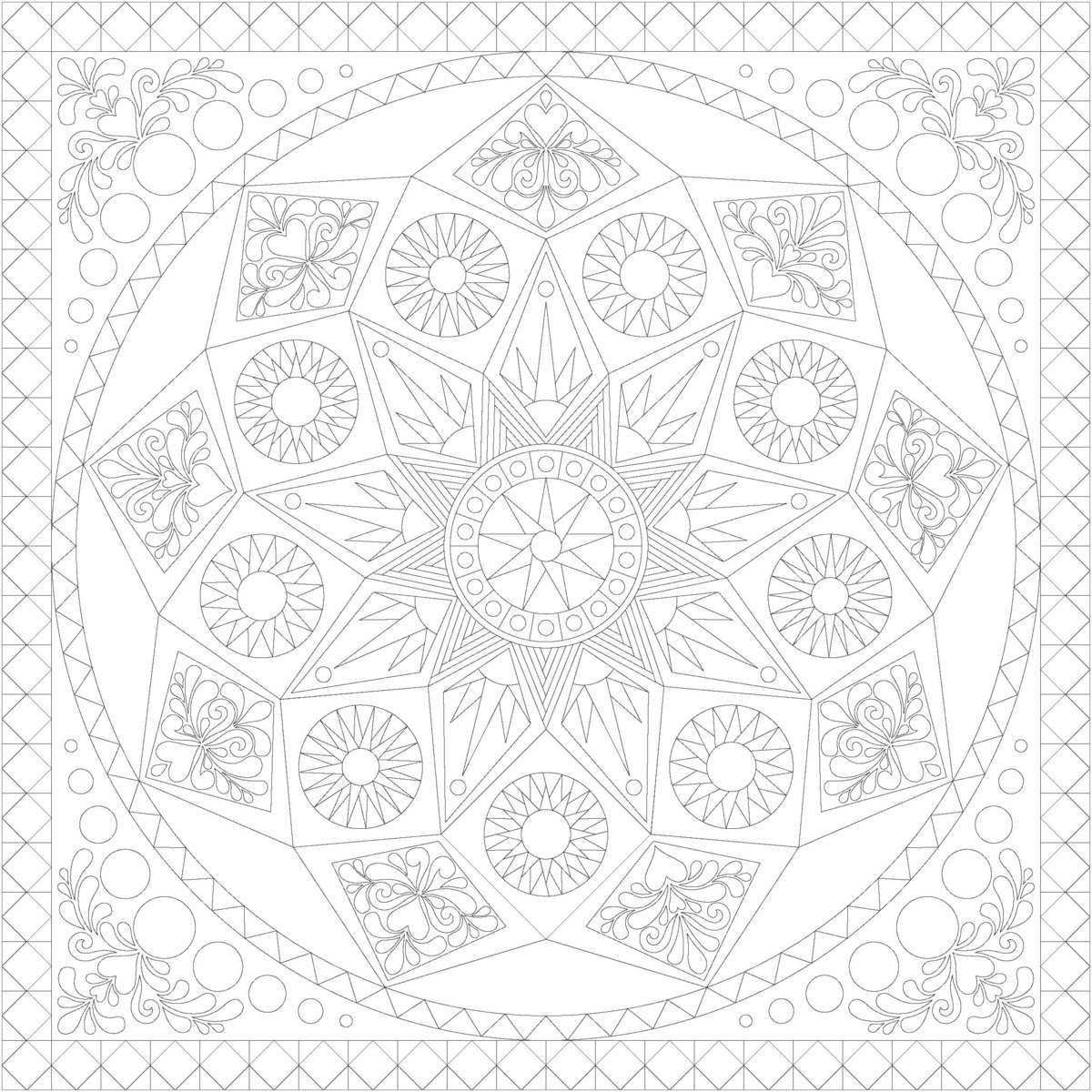
    Is anyone else having a problem seeing the blank drawing of the Sedona star? I printed it out and it was so light I thought the paper was blank. Is there a way to make it print darker :?:

    Pam in North Idaho

    #2
    Go to this topic:

    forum/sedona-star-2012/5075-fabric-requirements

    and scroll down to Nancy/rehak

    She explains a way to get around the problem.

    living in Central Denmark
    Charlie Brown: The secret is to look fantastic at a distance

    Comment


      #3
      I did that after I posted my question and I was able to have it print a little darker. I guess I was hoping for a dark black outline option, but I think I can make this work

      living in Central Denmark
      Charlie Brown: The secret is to look fantastic at a distance

      Comment


        #4
        I have had the same problem with my MacBook. There is no 'properties' option that I can see. Has anyone any suggestions because I have now tried to print it out twice but it's just too light to use. Rita.

        Comment


          #5
          Save it to your hard drive then open it in Photoshop Elements. On the bottom left of the import screen you will see thumbprints. Change this to "fit page". Go to Enhance, Adjust Lighting, Brightness/Contrast. Change the brightness to -150 (all the way to the left). Do this twice. Now it should be dark enough to print. You can save the file in the desired format. I used a JPEG. This is a really pretty quilt. Have fun coloring it.

          Comment


            #6
            Here's my jpeg file if you don't have Photoshop Elements.
            Comment


              #7
              Thanks Annis I will try that. But it seems to me that it is an awful lot of trouble to go to. I don't see why they wouldn't make the copy darker to begin with.

              Comment


                #8
                Originally posted by Reetzbobeetz
                Thanks Annis I will try that. But it seems to me that it is an awful lot of trouble to go to. I don't see why they wouldn't make the copy darker to begin with.
                They are working on it, but I haven't heard what kind of progress they are making!


                It's Not What You Gather, But What You Scatter
                That Tells What Kind Of Life You Have Lived !

                Comment


                  #9
                  Hi Annis,
                  Thank you for taking the time to share the jpeg copy and the instructions for using Photoshop to enlarge and darken the pattern. It really does make it much easier for me to see the pieces of the quilt without being distracted by the colors. My plan is to look at the quilts online to get the values, and also to go shopping for some great focus fabric. This is going to be another awesome BOM!

                  Kathy


                  It's Not What You Gather, But What You Scatter
                  That Tells What Kind Of Life You Have Lived !

                  Comment


                    #10
                    I just got this e-mail from Lilo:

                    We have uploaded a new “no color template” for the 2012 BOM.


                    It's Not What You Gather, But What You Scatter
                    That Tells What Kind Of Life You Have Lived !

                    Comment


                      #11
                      Can anyone give me some direction on downloading the Corel Draw item to use with my Bernina Designer software? :?: :?: :?: I have tried a couple times, but just don't seem to know how to download the right file and then open and use my Bernina embroidery software.

                      THANKS FOR ANY HELP YOU CAN PROVIDE!!!

                      Mary Kay

                      Comment


                        #12
                        Well, I figured out my own problem with some online research last night.... My version of bernina software doesn't read Corel draw. The upgrade will be a purchase to contemplate.... :?

                        Comment

                        What's Going On

                        Collapse

                        There are currently 5313 users online. 138 members and 5175 guests.

                        Most users ever online was 45,077 at 12:30 PM on 02-01-2026.

                        Forum Stats

                        Collapse

                        Topics: 8,421   Posts: 157,215   Members: 29027   Active Members: 1,054  
                        Welcome to our newest member, [email protected].

                        Latest Topics

                        Collapse

                        • BOM 2027 - Flight of the Bumblebee
                          I am using Grunge for the fabrics. The kit is lovely but the postage was a killer to Australia so I chose my own in similar...
                        • GETTING READY — Ask Questions Here
                          I don’t believe so. These are custom dies specially made for this quilt. The only embroidery on the quilt is straight...
                        • GETTING READY — Ask Questions Here
                          Accuquilt applique dies usually come with the embroidery stitches. Will the BOM applique also come with these stitch designs?...
                        • MONTH 6 - Ask Questions Here
                          Please use this TOPIC to ask questions about Month 6.
                        • MONTH 6 - Share Your Progress Here
                          Please use this TOPIC to share your work.
                        • MONTH 5 -- Share Your Progress Here
                          Month 6...
                        • Really enjoyed your class. It helps a lot. Thank you. Pat
                        • 14 Years Later...
                          Love it, Keith! You've taken the HST to new heights! The flower blocks and floating circles are great. (and I covet that...
                        • GETTING READY — Ask Questions Here
                          My order has been changed. Thank you to Barbara and The Quilt store for their quick response. Can't wait to star this...
                        • BOM 2027 - Flight of the Bumblebee
                          Both pre-order kits look amazing, but I'll need to use my own fabric choices too re high cost of postage to UK plus customs...
                        • GETTING READY — Ask Questions Here
                          I just asked someone from Customer Service to answer your post. You should hear something tomorrow, Tuesday June 2.
                        • GETTING READY — Ask Questions Here
                          Customer service is open until 3PM pacific time. I have sent them a few emails with no response regarding switching the...
                        • Color my world — your finish here
                          I finally finished my version of Color My World, I'm calling it Color My World, My Way. The top was finished in summer 2024...
                        • Loading...
                        • No more items.

                        Trending

                        Collapse

                        There are no results that meet this criteria.

                        Working...
                        X